
How to Write a Dissertation Table of Contents, List of Figures and Tables

Have you completed your dissertation but are unsure how to organise the contents page? Do you need separate lists of figures and tables? Or are you struggling to create an automatic table of contents in Microsoft Word without getting the page numbers wrong?
A well-organised dissertation table of contents helps readers navigate your research, locate individual chapters and find supporting information. The list of figures and list of tables serve a similar purpose by identifying visual material and showing where it appears in your document. However, incorrect headings, inconsistent numbering and outdated page references can make even a well-written dissertation difficult to follow.
This guide explains how to write a dissertation table of contents, prepare lists of figures and tables, and format everything in Microsoft Word. It also includes practical examples, UK university formatting guidance and a final submission checklist.
What Is a Dissertation Table of Contents?
A dissertation table of contents is an organised list of the chapters, sections and subsections included in an academic research document. It displays their titles alongside corresponding page numbers, allowing readers to locate specific information without searching through the entire dissertation.
It normally appears in the preliminary pages, before the main body of the research. Its exact position depends on your university’s formatting requirements.
A dissertation contents page may include:
- Abstract and acknowledgements, where required.
- List of figures and list of tables.
- List of abbreviations or glossary, if applicable.
- Main dissertation chapters.
- Numbered sections and subsections.
- Reference list or bibliography.
- Appendices and their titles.
The contents page should reflect the actual organisation of your dissertation. Every heading included in it must match the wording and numbering used in the main document.
Why Is a Dissertation Contents Page Important?
A clear contents page improves the presentation and usability of academic research. It allows supervisors, examiners and other readers to understand how your research is organised.
Its main purposes include:
- Improving navigation: Readers can locate particular chapters and sections quickly.
- Showing research organisation: The hierarchy of headings makes relationships between different parts of your research easier to understand.
- Supporting academic presentation: Consistent formatting gives the dissertation an organised appearance.
- Helping readers locate supporting material: Page references make it easier to find appendices, references, figures and tables.
- Demonstrating attention to detail: Accurate headings and page numbers help avoid unnecessary confusion during assessment.
A contents page does not improve the quality of your research by itself. However, it makes the finished dissertation easier to navigate and assess.
What Should Be Included in a Dissertation Table of Contents?
A dissertation contents page should include the main sections of your research in the order in which they appear in the document. It should also show relevant subsections, the reference list and appendices.
The exact requirements depend on your course and university. Some institutions also require preliminary sections, such as an abstract, acknowledgements or declaration, to appear in the contents page.
1. Preliminary Pages
Preliminary pages are the sections placed before the main chapters of a dissertation. They provide essential information about the research and help readers understand the document.
Depending on your university’s requirements, they may include:
- Title page
- Declaration of originality
- Acknowledgements
- Abstract
- Table of contents
- List of figures
- List of tables
- List of abbreviations
- Glossary, if required
Not every dissertation needs all these sections. For example, a list of abbreviations may be unnecessary if your research uses very few specialist terms.
Check your dissertation handbook to establish which preliminary pages are compulsory and whether they should appear in the contents page.
2. Main Dissertation Chapters
The main body contains the central research discussion. Its headings and subheadings should appear in the contents page with the correct numbering and page references.
A typical empirical dissertation structure may include:
| Chapter | Main sections |
|---|---|
| Chapter 1: Introduction | Background, research problem, aim, objectives and research questions |
| Chapter 2: Literature Review | Existing research, theoretical framework and research gaps |
| Chapter 3: Research Methodology | Research design, sampling, data collection and analysis |
| Chapter 4: Results and Findings | Presentation of collected data and research findings |
| Chapter 5: Discussion | Interpretation of findings and comparison with existing research |
| Chapter 6: Conclusion | Research summary, implications, limitations and recommendations |
This is an illustrative structure. Some undergraduate and postgraduate dissertations combine Results and Discussion into one chapter or use different chapter titles according to their subject and research design.
3. References and Appendices
The reference list or bibliography and appendices should normally be identified in the contents page.
The reference section contains the sources cited throughout your dissertation. Appendices provide additional supporting material that would interrupt the flow of the main discussion if included in the chapters.
Examples of dissertation appendices include:
- Interview questions
- Survey questionnaires
- Participant information sheets
- Consent forms
- Supplementary data
- Additional statistical tables
- Research instruments
Give each appendix a clear title, such as Appendix A: Questionnaire or Appendix B: Interview Guide. Include the relevant page numbers in the contents page.
Dissertation Table of Contents Example and Format
A dissertation contents page should present information in a clear hierarchy. Main chapters should be visually distinguishable from their subsections, while page numbers should be aligned consistently.
The following is an illustrative example of a Master’s dissertation contents page.
Example of a Dissertation Contents Page
TABLE OF CONTENTS
| Section | Page |
|---|---|
| Abstract | iii |
| Acknowledgements | iv |
| List of Figures | v |
| List of Tables | vi |
| List of Abbreviations | vii |
| Chapter 1: Introduction | 1 |
| 1.1 Background of the Study | 2 |
| 1.2 Research Problem | 3 |
| 1.3 Research Aim and Objectives | 4 |
| 1.4 Research Questions | 5 |
| 1.5 Significance of the Study | 6 |
| Chapter 2: Literature Review | 8 |
| 2.1 Introduction | 8 |
| 2.2 Theoretical Framework | 10 |
| 2.3 Review of Previous Studies | 13 |
| 2.4 Research Gap | 18 |
| Chapter 3: Research Methodology | 21 |
| 3.1 Research Philosophy | 22 |
| 3.2 Research Approach | 24 |
| 3.3 Research Design | 26 |
| 3.4 Data Collection Methods | 28 |
| 3.5 Ethical Considerations | 31 |
| Chapter 4: Results and Findings | 34 |
| 4.1 Introduction | 34 |
| 4.2 Presentation of Findings | 36 |
| 4.3 Data Analysis | 40 |
| Chapter 5: Discussion | 48 |
| 5.1 Interpretation of Findings | 49 |
| 5.2 Comparison with Previous Research | 53 |
| Chapter 6: Conclusion | 58 |
| 6.1 Summary of Findings | 59 |
| 6.2 Research Limitations | 61 |
| 6.3 Recommendations | 63 |
| References | 66 |
| Appendix A: Questionnaire | 72 |
| Appendix B: Participant Information Sheet | 75 |
Note: This is a fictional example for demonstrating formatting. The page numbers, chapter titles and preliminary-page sequence should be adjusted to match your actual dissertation and university handbook.
How to Number Dissertation Chapters and Subsections
A consistent numbering system makes your dissertation easier to navigate.
A common approach uses Arabic numerals for chapters and decimal numbering for their subsections.
For example:
-
- Introduction
- 1.1 Background of the Study
- 1.2 Research Aim
- 1.2.1 Primary Research Aim
- 1.2.2 Research Objectives
-
- Literature Review
- 2.1 Theoretical Framework
- 2.2 Previous Studies
The first number identifies the chapter, while the following numbers identify sections and subsections.
Use a consistent heading hierarchy throughout the document. Avoid creating unnecessary levels of subsections, as excessive numbering can make your contents page difficult to read.
How Many Heading Levels Should a Dissertation Contents Page Include?
For most dissertations, including chapter headings and the main subsections provides sufficient detail. A third heading level can be included when it helps readers understand the organisation of a particularly complex chapter.
For example:
- Level 1: Chapter 2: Literature Review
- Level 2: 2.1 Theoretical Framework
- Level 3: 2.1.1 Social Learning Theory
You do not need to include every minor heading. Select the levels that help readers understand your research structure without making the contents page unnecessarily long.
How to Create a Dissertation Table of Contents in Microsoft Word
Microsoft Word can automatically generate a dissertation table of contents using the heading styles applied throughout your document.
This is generally more reliable than typing chapter titles and page numbers manually. When you edit your dissertation, you can update the automatic contents page to reflect changes.
Follow these steps to create one.
Step 1: Apply Heading Styles to Your Dissertation
Before inserting a contents page, organise your chapter titles and subsections using Word’s built-in heading styles.
- Open your dissertation in Microsoft Word.
- Select your first chapter title.
- Open the Home tab.
- Find the Styles section.
- Select Heading 1 for the main chapter title.
- Select Heading 2 for the main sections within that chapter.
- Select Heading 3 for relevant subsections.
Repeat these steps throughout your dissertation.
For example:
| Dissertation heading | Microsoft Word style |
|---|---|
| Chapter 1: Introduction | Heading 1 |
| 1.1 Background of the Study | Heading 2 |
| 1.1.1 Research Context | Heading 3 |
| Chapter 2: Literature Review | Heading 1 |
| 2.1 Theoretical Framework | Heading 2 |
You can customise the appearance of each heading style to match your university’s font, size, spacing and formatting requirements.
Step 2: Insert the Automatic Table of Contents
After applying heading styles, you can generate the contents page.
- Place your cursor on the page where you want the contents section to appear.
- Open the References tab.
- Select Table of Contents.
- Choose one of the Automatic Table of Contents options.
- Word will generate the contents page using your formatted headings.
The document will display chapter titles, subsections and their corresponding page numbers.
Step 3: Customise the Contents Page
You can adjust the appearance of the contents page to suit your dissertation requirements.
Select References > Table of Contents > Custom Table of Contents.
Depending on your Word version, you can customise:
- Number of heading levels displayed.
- Page number alignment.
- Dotted lines between headings and page numbers.
- Formatting of different heading levels.
- Overall table appearance.
For a typical dissertation, showing two or three heading levels is often sufficient, provided your university permits this arrangement.
Step 4: Update the Table of Contents
Your contents page may become inaccurate when you add paragraphs, remove sections or change chapter headings.
To update it:
- Click anywhere inside the contents page.
- Select Update Table or Update Field.
- Choose Update page numbers only if the headings remain unchanged.
- Choose Update entire table if you have added, removed or renamed headings.
- Confirm the update.
Always update the contents page after completing your final edits.
Important: A manually created contents page will not automatically respond to changes in your document. Use an automatic table of contents whenever possible.
What Is a List of Figures in a Dissertation?
A list of figures is a separate section that identifies the figures included in your dissertation and shows their corresponding page numbers.
Figures can include:
- Graphs and charts
- Photographs
- Diagrams
- Maps
- Illustrations
- Conceptual frameworks
- Flowcharts
- Research models
The purpose of a dissertation list of figures is to help readers locate visual information without searching through individual chapters.
For example, a dissertation investigating employee motivation might include a conceptual framework, research model and statistical charts. A list of figures allows readers to locate these items quickly.
What Should a Dissertation List of Figures Include?
A list of figures generally includes three main elements:
- Figure number.
- Figure title or caption.
- Page number.
For example:
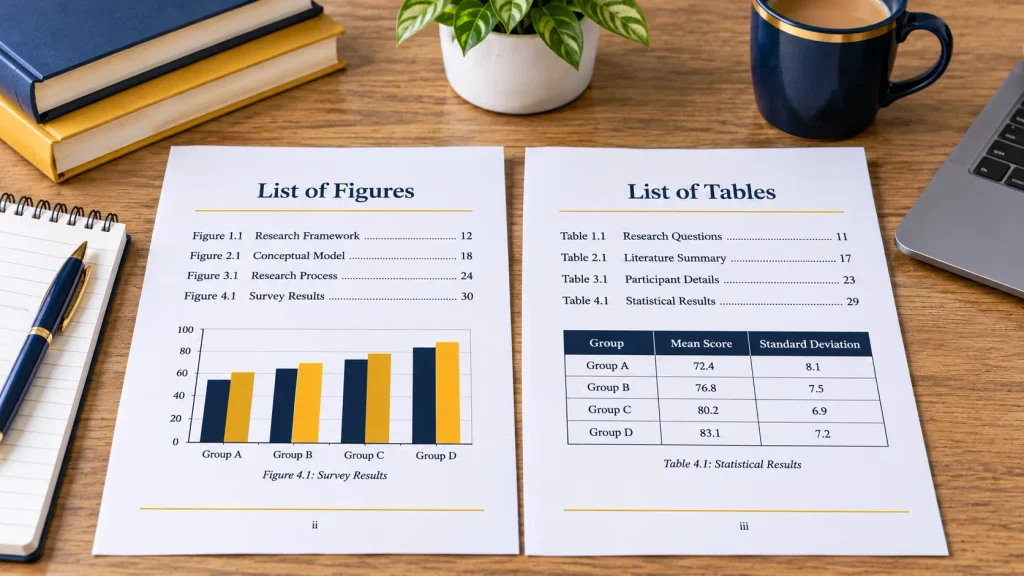
LIST OF FIGURES
| Figure | Title | Page |
|---|---|---|
| Figure 1.1 | Conceptual Framework of the Study | 12 |
| Figure 2.1 | Employee Motivation Model | 19 |
| Figure 3.1 | Research Design Flowchart | 27 |
| Figure 4.1 | Distribution of Survey Respondents | 38 |
| Figure 4.2 | Relationship Between Variables | 42 |
Illustrative example only.
Figures should be numbered consistently throughout your dissertation. You can use continuous numbering, such as Figure 1, Figure 2 and Figure 3, or chapter-based numbering, such as Figure 1.1 and Figure 2.1. Follow the convention required by your university or department.
How to Write Figure Captions
Every figure should have a clear and descriptive caption.
A caption should explain what the figure represents without requiring the reader to guess its purpose.
For example:
Figure 2.1: Conceptual Framework Illustrating the Relationship Between Employee Motivation and Job Performance
If a figure has been reproduced or adapted from another publication, acknowledge the original source using the appropriate referencing style and check whether permission is required.
Also refer to figures in your main discussion. For example:
“As illustrated in Figure 2.1, employee motivation is examined through three key dimensions.”
Avoid referring to visuals only as “the figure below” because their positions may change during editing.
What Is a List of Tables in a Dissertation?
A dissertation list of tables is an organised section containing the titles, numbers and page references of all relevant tables used in the research.
Tables usually present numerical information, statistical results, comparisons, classifications or organised research data.
For example, a dissertation examining customer satisfaction might include demographic information, survey responses and statistical comparisons. A separate list of tables allows readers to locate this information easily.
What Should a Dissertation List of Tables Include?
A typical list of tables contains:
- Table number.
- Table title.
- Corresponding page number.
For example:
LIST OF TABLES
| Table | Title | Page |
|---|---|---|
| Table 1.1 | Summary of Research Objectives | 8 |
| Table 2.1 | Comparison of Previous Studies | 17 |
| Table 3.1 | Participant Selection Criteria | 29 |
| Table 4.1 | Demographic Characteristics of Respondents | 36 |
| Table 4.2 | Descriptive Statistics of Research Variables | 41 |
Illustrative example only.
How to Format Dissertation Tables
Each table should have a descriptive title and consistent numbering.
Keep the following points in mind:
- Place the table number and title above the table if required by your referencing style.
- Use clear column headings.
- Keep the formatting consistent throughout the dissertation.
- Include units of measurement where necessary.
- Reference the table in the relevant paragraph.
- Acknowledge the source of reproduced or adapted information.
For example:
“Table 4.1 presents the demographic characteristics of the participants, including their age groups, educational backgrounds and employment status.”
The reader should understand why the table is included and how it contributes to your research discussion.
How to Create a List of Figures and Tables in Microsoft Word
Microsoft Word includes a feature called Insert Table of Figures. Despite its name, this feature can generate a list of figures, a list of tables or another caption-based list.
The essential requirement is to add captions to your visual material first.
Step 1: Add Captions to Figures
- Select the figure in your dissertation.
- Open the References tab.
- Select Insert Caption.
- Choose Figure from the Label dropdown.
- Enter an appropriate title.
- Select OK.
Word will insert a numbered caption for the selected figure.
Repeat this process for the remaining figures.
Step 2: Generate an Automatic List of Figures
Once all figure captions have been inserted:
- Place your cursor where the list of figures should appear.
- Open the References tab.
- Select Insert Table of Figures.
- Choose Figure from the Caption Label dropdown.
- Adjust the formatting and page number options.
- Select OK.
Word will automatically collect the captions labelled as figures and display them with their page numbers.
Step 3: Add Captions to Tables
Follow a similar process for your dissertation tables.
- Select the table.
- Open the References tab.
- Select Insert Caption.
- Choose Table from the Label dropdown.
- Enter the table title.
- Select OK.
Repeat the process for all tables.
Step 4: Generate an Automatic List of Tables
To create a separate list of tables:
- Place your cursor on a new page where the list should appear.
- Select References.
- Open Insert Table of Figures.
- Choose Table from the Caption Label dropdown.
- Adjust the formatting.
- Select OK.
Word will generate a separate list containing your numbered tables and page references.
Step 5: Update Both Lists Before Submission
If you move, delete or add figures and tables, their page numbers and captions may change.
To update a list:
- Click inside the existing list.
- Select Update Table.
- Choose Update page numbers only or Update entire table.
- Confirm the changes.
Repeat this process for both lists.
You can also select the document and update its fields using Ctrl+A followed by F9 in Word for Windows. Check the resulting captions, cross-references and lists afterwards.
Where Do the Contents Page, List of Figures and List of Tables Go?
The position of these sections depends on your institution’s dissertation guidelines.
A possible arrangement is:
- Title page
- Declaration, if required
- Abstract
- Acknowledgements, if required
- Table of contents
- List of figures
- List of tables
- List of abbreviations, if required
- Main dissertation chapters
- References
- Appendices
However, this is not a universal UK format.
For example, the University of Salford’s March 2026 dissertation formatting guide presents the following sequence:
- Title page
- Declaration, if applicable
- Table of contents
- List of figures or illustrations, if applicable
- List of tables, if applicable
- Acknowledgements or dedication
- List of abbreviations, if applicable
- Abstract
- Main body
- References or bibliography
- Appendices
The University of York provides a different recommended sequence for monograph theses. It places the abstract before the list of contents and specifies that the contents should identify the relevant sections and their starting page numbers.
Glasgow Caledonian University’s thesis preparation guidelines also place lists of figures and tables after the contents page. They allow separate lists or a combined heading when a thesis contains only a few figures and tables.
These examples demonstrate why you should check your own university’s handbook before finalising the order.
Should the List of Figures and List of Tables Be Separate?
This depends on your dissertation requirements and the amount of visual material included.
Consider separate lists when:
- Your dissertation contains several figures and tables.
- Your university specifically requires separate lists.
- Different types of visual information need to be located independently.
- Your research includes extensive statistical or graphical material.
A combined list may be acceptable when there are only a few figures and tables, provided your institution permits it.
Do not assume that a separate list is compulsory for every dissertation.
How Should Dissertation Page Numbers Be Formatted?
Page numbering is another important part of dissertation formatting.
Some UK university guidelines use Roman numerals for preliminary pages and Arabic numerals for the main chapters. However, this is not compulsory across all institutions.
For example, the University of York’s thesis formatting guidance specifies a single continuous page-numbering sequence. The title page counts as page 1, although its number is hidden, and numbering continues through the abstract, main chapters, illustrations and appendices.
Your institution may use a different arrangement.
| Dissertation section | Possible numbering format |
|---|---|
| Title page | Number may be hidden |
| Preliminary pages | Roman numerals or continuous Arabic numbering |
| Main chapters | Arabic numerals |
| References and appendices | Follow institutional requirements |
How to Use Roman and Arabic Numerals in Word
If your university requires different numbering formats for preliminary pages and the main dissertation, Microsoft Word allows you to manage them using section breaks.
A typical process involves:
- Place your cursor at the end of the preliminary section.
- Open Layout and select Breaks.
- Insert a Next Page section break.
- Open the footer or header in the new section.
- Disable Link to Previous if you need independent numbering.
- Select Page Number and then Format Page Numbers.
- Choose Arabic numerals and set the starting number to 1.
- Keep the preliminary section in the numbering format required by your university.
- Check the final document to ensure the numbering is correct.
The exact settings depend on your document layout and institutional requirements.
Common Dissertation Contents Page and Formatting Mistakes
Even a well-written dissertation can look poorly organised if its contents page and supporting lists contain formatting errors.
Check the following issues before submitting your work.
1. Incorrect Page Numbers
A common mistake is leaving old page numbers in the contents page after editing the dissertation.
How to avoid it: Update the automatic table of contents and both lists of figures and tables after making final changes.
2. Inconsistent Chapter Headings
Using different chapter titles in the contents page and main document creates confusion.
How to avoid it: Use identical wording, spelling, numbering and capitalisation throughout your dissertation.
3. Missing Subsections
Some students include chapter titles but forget important subsections.
How to avoid it: Apply the appropriate heading styles and check which levels your university expects in the contents page.
4. Incorrect Figure and Table Numbering
Using duplicate numbers or changing the numbering system halfway through the dissertation can make visual material difficult to locate.
How to avoid it: Choose a consistent numbering convention and use Word’s caption feature to manage figure and table numbers.
5. Missing Figure or Table Captions
If you do not use Word’s Insert Caption feature, the automatic lists may not recognise your figures and tables.
How to avoid it: Add captions consistently and check that every relevant item appears in its correct list.
6. Inconsistent Page Formatting
Different fonts, spacing, indentation and page number positions can make the dissertation look untidy.
How to avoid it: Follow your university’s formatting instructions and use Word’s styles to maintain consistency.
7. Forgetting to Include Appendices
Appendices can be overlooked when students prepare the final contents page.
How to avoid it: Give each appendix a clear title and include it in the contents page with its correct page reference.
Final Dissertation Formatting Checklist
Before submitting your dissertation, use this checklist to review the contents page and supporting lists.
- The contents page follows the required university format.
- All required preliminary sections are included.
- Chapter titles match the main dissertation.
- Section and subsection numbering is consistent.
- Heading levels are used correctly.
- Page numbers match the final document.
- The list of figures includes all relevant figures.
- The list of tables includes all relevant tables.
- Figure and table captions are descriptive.
- All figures and tables are referenced in the main text.
- Appendices appear in the contents page.
- Roman and Arabic page numbering is correct, where required.
- The automatic contents page has been updated.
- Both figure and table lists have been updated.
- The final document follows the university’s dissertation handbook.
Completing these checks before submission can help you identify presentation errors that might otherwise be overlooked.
Frequently Asked Questions
1. What should be included in a dissertation table of contents?
A dissertation table of contents should normally include chapter titles, main sections, relevant subsections, references and appendices. Depending on university requirements, it may also include preliminary sections and separate lists of figures, tables and abbreviations.
2. Where does the table of contents go in a dissertation?
The table of contents usually appears in the preliminary pages, before the main chapters. Its exact position depends on your university’s formatting guidelines. Some institutions place it after the abstract, while others use a different preliminary-page sequence.
3. Do I need a separate list of figures and tables?
You may need separate lists if your dissertation contains several figures and tables or if your university requires them. Some institutions permit a combined list when there are only a few items. Always check your dissertation handbook.
4. How do I create an automatic dissertation table of contents in Word?
Apply Heading 1, Heading 2 and Heading 3 styles to the relevant headings. Then open References, select Table of Contents and choose an automatic format. Word will generate the contents page using your headings and page numbers.
5. Should the abstract be included in the dissertation contents page?
This depends on your university’s requirements. Some institutions include the abstract in the contents page, while others place it before the contents page without listing it. Follow your course handbook rather than assuming one approach applies everywhere.
6. Should figures and tables be numbered by chapter?
Figures and tables can be numbered continuously throughout the dissertation or separately within each chapter. For example, you may use Figure 1, Figure 2 and Figure 3, or Figure 1.1, Figure 1.2 and Figure 2.1. Use the numbering convention specified by your institution.
7. How do I update page numbers in a dissertation contents page?
Click inside the automatic contents page in Microsoft Word and select Update Table or Update Field. Choose Update page numbers only if your headings have not changed. If you have edited or added headings, select Update entire table.
8. Can I create a list of figures and tables automatically in Word?
Yes. First, add captions to each figure and table using References > Insert Caption. Then select References > Insert Table of Figures and choose the appropriate caption label. Word will generate the list with corresponding page numbers.
Conclusion
A well-formatted dissertation table of contents, list of figures and list of tables makes academic research easier to navigate and gives the finished document a consistent structure.
The most reliable approach is to organise your dissertation using Word’s built-in heading styles, generate the contents page automatically and use caption-based lists for figures and tables. This reduces manual formatting work and makes it easier to update page references when your dissertation changes.
Remember that UK universities can have different requirements for preliminary pages, numbering systems and dissertation layouts. Check your department’s handbook before applying a particular format, and review every section before submitting your final document.
If you need further guidance with dissertation structure, formatting or proofreading, explore the academic resources available at HelpWithDissertation and check the requirements of your university before submission.
References and Further Reading
The following university and software resources provide additional guidance on dissertation formatting, contents pages and Microsoft Word features.
- University of Salford: Formatting Your Dissertation/Thesis (March 2026)
- University of York: Format Your Thesis
- Glasgow Caledonian University: Thesis Preparation Guidelines
- Microsoft Support: Insert a Table of Contents
- Microsoft Support: Insert a Table of Figures
- Microsoft Support: Add, Format or Delete Captions in Word
- Scribbr: How to Write a Dissertation