
How to Format a Dissertation: Margins, Fonts, Title Page and Appendices (UK Guide)

Is 12pt Arial safe? Should the title page carry a number? Do appendices count towards your word limit? These questions tend to surface the night before submission. To format a dissertation correctly, start with your own school’s handbook, because UK universities do not share one national standard. Where the handbook is silent, the defaults that follow match what several UK universities publish: A4 paper, a clear 12pt font, 1.5 or double line spacing, margins of at least 2.5 cm and consistent numbering throughout.
The advice suits undergraduate and Master’s projects. A PhD thesis normally follows stricter graduate school regulations on binding, deposit and word limits, so research students should read their research degree regulations first. Position correct as of November 2026; check your department handbook and marking criteria for the current rules.
Dissertation Formatting Guidelines: Whose Rules Do You Follow?
Your module guide, handbook or submission page always comes first. Salford’s Word formatting manual says there is no single university-wide specification and that requirements can differ by school and by undergraduate or postgraduate level. If your department says nothing on a point, fall back on university regulations, then on the defaults in this article.
The published examples below show how much the requirements vary.
| UK source | What it sets |
|---|---|
| Leeds University Business School | Margins of at least 2.5 cm on every side, 1.5 or double spacing, a standard font between 10 and 12pt. Word’s default 2.54 cm margins are accepted. |
| University of Exeter (undergraduate and taught postgraduate style guide) | 30 mm left and right, 20 mm top and bottom, double or 1.5 spacing, one page sequence with the title page as page 1. |
| University of Birmingham (thesis guidance) | Binding-edge margin of at least 3 cm, double spacing, Arial recommended at 12pt, preliminary pages numbered separately or left unnumbered. |
| University of Bristol (taught programmes annex) | Double or 1.5 spacing, page numbers at the bottom centre, title page counted as page 1, appendices included in the numbering. |
| London Metropolitan University (postgraduate dissertations) | 2.5 cm margins and page numbers at the centre foot of each page. |
| University of Warwick (History department) | Standard margins such as Word’s 2.54 cm default, double spacing, 12pt Arial, Calibri or Times New Roman, text left-aligned or justified. |
No single setting satisfies every row, which is exactly why the handbook wins. Treat the table as proof that “I used the usual settings” is not a safe assumption.
Dissertation Margins and Font: Safe Settings When the Handbook Is Silent
What are the margins for a dissertation?
Most UK examples sit at 2.5 cm or more on every edge. Leeds University Business School’s dissertation format regulations set a 2.5 cm floor and confirm that Word’s standard 2.54 cm setting is acceptable. Extra space on the binding side appears where printed copies are expected, with Birmingham asking for at least 3 cm and Exeter for 30 mm on the sides. If you print double-sided, use mirrored margins so the binding space is not counted twice.
Which dissertation font and size should you use?
Pick one clear, standard font in black and use it for all body text. Birmingham recommends Arial at 12pt but accepts any plain sans serif, Warwick’s History department lists Arial, Calibri or Times New Roman at 12pt, and Leeds allows 10 to 12pt while banning text set only in capitals. Avoid using colour to carry meaning, since printed or greyscale copies lose it.
Alignment matters less, but it should be consistent. Warwick asks for left-aligned or justified text rather than centred or right-aligned paragraphs. Left alignment avoids the uneven word gaps that justified text can produce.
Dissertation Line Spacing and Paragraph Settings
Body text is usually set at 1.5 or double spacing. Leeds and Bristol accept either, while Birmingham and Warwick’s History department ask for double. Single spacing is normally allowed for quotations, footnotes, captions and the bibliography, and Birmingham lists all four.
Choose one paragraph style and keep it: either a first-line indent or a gap after each paragraph, not both. Set the choice inside Word’s Normal style once, so pasted text does not bring its own spacing with it.
Dissertation Structure: The Usual Order of Pages
A taught-degree dissertation normally runs in this order: title page, any required declaration or cover sheet, abstract, acknowledgements, contents, lists of tables and figures, the main chapters, the reference list and then appendices. The order is not universal. Birmingham places the abstract straight after the title page, while one Warwick postgraduate guide puts the contents page first and the acknowledgements after it.
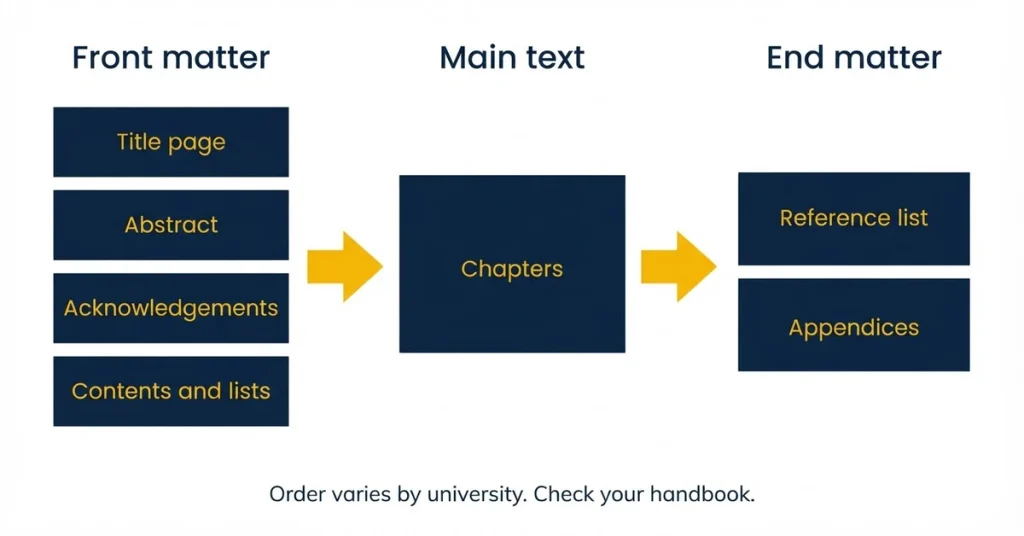
Plan the chapters before you format them. An outline that mirrors your chapters gives you the headings that will later feed the contents page. Start each chapter on a new page, as Birmingham advises.
Dissertation Title Page Format
What is the correct format for a dissertation title page?
Birmingham’s thesis guidance lists the title, your full name exactly as on your student record, the degree statement, the school, the university and the month of submission. Taught courses often add or replace parts of that. Leeds Business School requires its own title page template, Exeter requires a signed declaration about work that is not your own, and London Metropolitan asks for the full title of the study.
Keep the title specific and consistent in capitalisation. If your university marks anonymously, follow its instruction on candidate numbers instead of using your name.
Dissertation Page Numbers: One Sequence or Roman Then Arabic?
Conventions genuinely split. Exeter and Bristol count the title page as page 1 and number everything in one sequence, appendices included. Birmingham numbers preliminary pages separately or leaves them unnumbered. Check which model your department expects before touching the footer.
If you need lowercase Roman numerals for the front pages and Arabic numerals from Chapter 1, set it up in Word like this. Menu names vary slightly between Word versions and between Windows and Mac.
- Place the cursor at the end of the last front page and insert a section break (Layout, Breaks, Next Page).
- Open the footer of the first page of the new section and switch off “Link to Previous”.
- Insert page numbers, then use Format Page Number to set lowercase Roman numerals in the first section.
- In the second section, choose Arabic numerals and start at 1.
- Scroll the whole document to confirm no section shows a stray number or a blank page.
Headings, Tables and Figures in a Dissertation
Apply Word’s built-in Heading 1, 2 and 3 styles rather than bolding text by hand. Styled headings let you build the contents page automatically and keep it accurate when chapters move. Number headings in one system, such as 2.1 and 2.1.1, and apply it everywhere.
Place each table or figure near its first mention, with a full caption, as Birmingham advises, and refer to it in the text by number. Handbooks differ on whether captions sit above or below, so follow yours and repeat the choice throughout. Add a list of tables and a list of figures when you have several of each.
Formatting the Reference List and Bibliography
Use the referencing style your department asks for and apply it to every entry. Author-date styles such as Harvard and APA list sources alphabetically with a hanging indent, and single spacing is usual for the list. A reference generator helps with the layout, but check each entry against your style guide.
Every in-text citation needs a matching entry, and every entry needs a citation. If you collect sources as you go, this check takes minutes; tips on how to keep your references organised are in a separate guide.
How Should an Appendix Be Formatted in a Dissertation?
The University of Birmingham’s thesis formatting page describes appendices as supportive rather than critical to the main text. It asks you to number each one when there is more than one, and allows them at the end of a chapter or at the end of the thesis. Birmingham also excludes appendices from the word count, but other universities set their own rule, so confirm yours before you rely on it.
In practice, give each appendix a number and a descriptive title, such as “Appendix 2: Interview schedule”, and refer to it where the point arises. Many departments expect each appendix to begin on a new page. Typical contents include a dissertation questionnaire, an interview guide, a participant information sheet and evidence of ethics approval.
Remove personal data before including anything. Birmingham notes that copyright and sensitive-data rules apply to appendices, so anonymise transcripts and leave out signed consent forms that carry names.
Dissertation Formatting Checklist Before You Submit
Run through these checks on the final version, then export a PDF and read it page by page, because that is the version examiners usually see.
- Paper size is A4 and margins match your handbook.
- One font, one size and one colour for body text.
- Line spacing is 1.5 or double, with single spacing only where permitted.
- Title page contains every element your department requires, plus any declaration.
- Page numbers follow the required model and show no gaps or duplicates.
- Contents page updated, with entries matching the headings and page numbers.
- Every chapter starts on a new page, and heading levels look identical throughout.
- Tables and figures are numbered, captioned and mentioned in the text.
- Citations and the reference list match in both directions.
- Appendices are numbered, titled, cited in the text and anonymised.
- Word count checked against the limit, using the counting rules in your handbook.
- Tracked changes and comments accepted or removed.
Our wider dissertation checklist covers content and submission steps, and a word count calculator helps you split your limit across chapters. Build a formatting day into your dissertation timeline, since fields, numbering and the contents page often need a second pass.
Dissertation Formatting FAQs
Is a thesis formatted differently from a dissertation?
The core settings overlap, but research theses add rules on binding, deposit in a repository and abstract length. Birmingham’s thesis page, for example, limits the abstract to two pages and covers printing and binding only for examiners who request a printed copy. Taught-course dissertations follow the school’s own guidance.
Are Word’s default margins acceptable?
Sometimes. Leeds Business School and Warwick’s History department accept the 2.54 cm default, but Exeter asks for 30 mm on the sides and Birmingham for a wider binding edge. Confirm before you assume.
Can I use Calibri instead of Arial?
Where the rule is “a standard font”, as at Leeds, Calibri is fine. Where the department names Arial or Times New Roman, use those. Never mix fonts in the body text.
Do I have to print and bind my dissertation?
Check your submission instructions. Some courses collect work electronically, and Birmingham asks for a printed, soft-bound copy only if examiners request one.
Once the layout is settled, the next job is usually the writing itself. Master’s students who want support with structure and presentation can look at Master’s dissertation support, used as reference and learning material in line with your institution’s policy.