
How to Do a Literature Search: Keywords, Boolean Operators and Snowballing for Your Dissertation

I have a research question, but when I type it into Google Scholar I get thousands of results and most look unrelated. Which words should I search for? How do I combine them? Where else should I look? And how will I know when I have found enough?
The short answer: break your question into two or three concepts, list synonyms and spelling variants for each, join the synonyms with OR and the concepts with AND, then run the search in more than one database. Record every search, adjust it until the results fit your question, and finish by snowballing, which means following the reference lists and citations of your strongest sources. Stop when a new round stops producing relevant studies.
These steps suit the literature review chapter of a taught dissertation or Master’s project. A systematic review for a dissertation needs a written protocol, several databases and detailed reporting, so ask your supervisor which type your department expects. Database screens and symbols also change between universities, and your library’s own guidance and module handbook override anything written here.
What a Literature Search Is and Where It Fits in Your Dissertation
A literature search is a planned, repeatable way of finding the research your review will discuss. Reading comes afterwards. Leeds University Library describes a search strategy as a structured set of key terms, built from the core concepts of your question and adapted to each database you use.
You will use it more than once. At the dissertation proposal stage, a quick search shows whether enough research exists on your topic, a first check the Royal College of Nursing library recommends. Later, a fuller search feeds the chapter itself, and our guide to writing the chapter itself picks up where searching ends.
The whole process runs in seven steps, and each one has its own section below:
- Break the research question into concepts.
- List keywords, synonyms and spelling variants for each concept.
- Choose databases and other sources.
- Build the search with Boolean operators, phrases, truncation and fields.
- Run it, test it and adjust it.
- Record every search in a log.
- Snowball from the strongest results, then stop at saturation.
Break Your Research Question into Searchable Concepts
Databases match words, not questions. Pick out the main nouns in your question and ignore instruction words such as “evaluate” or “compare”, as the RCN library advises. Frameworks can help you spot the concepts: the RCN lists PICO (Population, Intervention, Comparison, Outcome), PEO (Population, Exposure, Outcome) and SPIDER, and notes that not every topic needs every element.
The worked example below uses an invented question for a business or psychology dissertation: How does remote working affect employee wellbeing in UK organisations? It has three concepts, and each concept gets its own list of alternative terms.
| Concept | Search terms to join with OR |
|---|---|
| Remote working | “remote work*”, “working from home”, homeworking, “home working”, telework*, “hybrid work*” |
| Wellbeing | wellbeing, “well-being”, burnout, “job stress”, “work-life balance” |
| Employees | employee*, worker*, staff |
Notice that “UK” is not a concept in the table. Location words can wrongly remove studies that cover several countries but still help you, so treat location as a screening decision under your inclusion and exclusion criteria, or add it last if the results are too many. The third concept is also optional. Test the search with and without it, because every extra AND concept can remove useful studies.
If you cannot yet name your concepts, the question itself is probably still loose. Start with choosing a research topic, then turn your idea into a research question. The free research question generator gives you draft wording to test.
Choose Keywords and Synonyms That Match How Researchers Write
Keywords are free-text words and phrases, and a keyword search usually checks titles and abstracts. That means you need the words authors actually use, which are not always the words in your question. Leeds University Library suggests three ways to find them: use a thesaurus, scan Google Scholar results, and read the abstracts of relevant articles for alternative terms.
Two habits catch most missed studies. First, add British and American spellings, such as behaviour and behavior or organisation and organization, because some databases match exact words only. Second, add abbreviations and hyphenated forms, since “well-being” and “wellbeing” may behave differently. Each time you meet a new term in a good paper, add it to your list.
Many databases also assign subject headings, a controlled vocabulary that describes what an article is about. Headings can retrieve relevant articles that never use your keywords, so combine them with free-text terms where the database offers them. Medline uses MeSH and Embase uses Emtree, and other databases have their own lists, so look for a thesaurus or subject terms option in each one.
Where to Search: Library Databases, Google Scholar and Grey Literature
Start with your university library, and search more than one source. Each database covers different journals, and some overlap is normal. A 2024 commentary on designing literature searches recommends abstracting and indexing databases as the starting point, because ordinary search engines are harder to repeat.
- Library Search: suits quick, simple searches, but dissertations need specialist databases as well, as the RCN library points out.
- Subject databases: use your library’s A to Z list, and ask the subject librarian which ones fit your module. Check that your institution has access before you build a long search in one.
- Scopus and Web of Science: multidisciplinary indexes that also show which later papers cite a given article, which you will need for snowballing.
- Google Scholar: free, with a broader crawl-based index that includes preprints, theses and repository copies. Library guides report that OR and intitle: work in it, but treat it as a supplement and use its Advanced search window for any search you must repeat. Position correct as of November 2026; check Google’s current help.
- Grey literature: material outside commercial publisher databases, such as government reports, conference proceedings, theses, standards and patents. Cranfield University library lists sources such as Overton and Open Access Theses and Dissertations. Because grey literature is often not peer reviewed, appraise it carefully.
If you cannot get a full text, check other libraries, ask about interlibrary loan, or look for a free copy the author has posted online.
How to Use Boolean Operators in a Literature Search
What Are Boolean Operators Used For in Literature Searches?
Boolean operators tell a database how to combine your keywords. OR widens a search, AND narrows it, and NOT excludes. Most databases treat them as the core search tools, and PubMed requires them in capital letters.
| Operator | What it does | Example | Effect on results |
|---|---|---|---|
| OR | Finds either term, so it suits synonyms inside one concept | wellbeing OR burnout | More results |
| AND | Finds records containing both concepts | homeworking AND wellbeing | Fewer, more focused results |
| NOT | Removes records containing a term | wellbeing NOT burnout | Fewer results, with a risk of losing relevant studies |
Use NOT sparingly. Greenwich, Leeds and the RCN all warn that it can silently remove relevant articles. In the example above, a strong study on wellbeing that mentions burnout in one sentence would disappear.
How to Search for Multiple Keywords at Once
Put the synonyms for one idea inside brackets joined by OR, then join the bracketed groups with AND. Brackets matter, because PubMed processes a search from left to right and brackets tell it which terms belong together. Here is the full string for the remote working example:
(“remote work*” OR “working from home” OR homeworking OR “home working” OR telework* OR “hybrid work*”) AND (wellbeing OR “well-being” OR burnout OR “job stress” OR “work-life balance”) AND (employee* OR worker* OR staff)
Phrase Searching, Truncation and Wildcards: Catch Every Variant
Quotation marks make a database look for words side by side as a phrase, so “job stress” will not match a paper that mentions a job in one paragraph and stress in another. Phrase searching narrows results and improves relevance, although a few databases handle it differently, so check the help text. PubMed, for instance, ignores quotation marks when a phrase is not in its phrase index.
Truncation uses a symbol, usually an asterisk, to capture word endings. Leeds gives therap* as an example that finds therapy, therapies and therapist. In our example, telework* picks up teleworking and teleworker. Avoid truncating too early, though. Greenwich warns that nut* returns nutrition, nuts and nutmeg, and in the same way work* would flood your results with workplace, workforce and workshop.
Wildcards stand in for a single character, which suits spelling variants. Leeds shows behavio?r finding both behaviour and behavior in Medline, and organi?ation would cover organisation and organization in databases that use the question mark. PubMed adds two rules worth knowing: a wildcard term needs at least four characters before the symbol, and wildcards switch off its automatic term mapping, so subject headings may stop being added.
Field Searching and Proximity Operators for More Precise Results
Databases store each record in fields such as title, author, abstract and subject terms. Field searching tells the database where to look. Searching titles only gives a small, specific set, while searching title and abstract is a common middle route, and in PubMed the tag [tiab] does exactly that.
Proximity operators find two terms within a set number of words of each other, in either order. This catches variations an exact phrase would miss, such as “physician patient relationship” when you searched for physician ADJ3 relationship in Ovid, an example Leeds uses. The syntax differs from one database to the next, which is why a search pasted between platforms often fails.
| Database or platform | Truncation symbols | Proximity syntax | Example |
|---|---|---|---|
| EBSCOhost (for example CINAHL, APA PsycInfo) | *, #, ? | Nn | homeworking N5 wellbeing |
| Web of Science | *, $, ? | NEAR/n | homeworking NEAR/5 wellbeing |
| Scopus | ? (one character) | W/n | homeworking W/5 wellbeing |
| Cochrane Library | * | NEAR/n | homeworking NEAR/5 wellbeing |
| Ovid | Check the database help | adjn | homeworking adj5 wellbeing |
| PubMed | * (at least four characters first) | “terms”[tiab:~N], not usable with wildcards | “homeworking wellbeing”[tiab:~5] |
Symbols follow the Greenwich University library guide and the PubMed help documentation. Interfaces change, so confirm syntax in the database’s own help before you rely on a string.
Run the Search, Test It and Adjust the Results
Searching is iterative, so expect to run the first version, judge it and rewrite it. Read abstracts, not only titles, before you decide that a record is relevant. Then use the table below to correct the balance.
| Problem | Fixes to try, in this order |
|---|---|
| Too many results | Add another concept with AND. Narrow the dates. Use phrases. Search title and abstract instead of all text. Replace a broad term with a specific one. Add location last. |
| Too few results | Check spelling. Add synonyms and spelling variants with OR. Widen the dates. Remove location terms. Drop the least important concept. Try another database. |
| Irrelevant results | Look for a term with a second meaning. Use phrases or field searching. Check that NOT is not distorting the search. |
Test Your Search Against Papers You Already Know
Gionfriddo and colleagues, writing in Research in Social and Administrative Pharmacy in 2024, suggest checking a search against exemplars: highly relevant papers you already have. A sound strategy should retrieve them. If it does not, find out why. The cause is often a missing synonym, a different database or an indexing difference, and each of those is fixable.
A Five-Point Self-Check Before You Rely on a Search
The same authors adapt the PRESS peer review checklist for self-evaluation. In plain terms, ask yourself:
- Does the string cover every part of my question without being too broad or too narrow?
- Are AND, OR and NOT used correctly, and could NOT remove relevant studies?
- Are spellings right, and have I included synonyms and acronyms?
- Is the syntax correct for this database, and have I searched the right fields?
- Can I justify every limit, such as date or language?
Keep a Literature Search Log You Can Repeat
Record each search while you work, not at the end. Documentation supports transparency, helps you spot errors and lets you update the search later. The RCN library recommends noting your terms, combinations, limits and result counts, and saving results to reference software such as Zotero, RefWorks, EndNote or Mendeley.
| Date | Database and platform | Search string, exactly as run | Limits | Results | Notes |
|---|---|---|---|---|---|
| [date] | [for example Scopus] | [paste the full string] | [dates, language] | [number] | [what you changed and why] |
Name the platform as well as the database, because the same database behaves differently on different platforms. Once your sources are saved, the free reference generator can help you format the final reference list in your department’s style.
Snowballing in a Literature Review: Backward and Forward Citation Searching
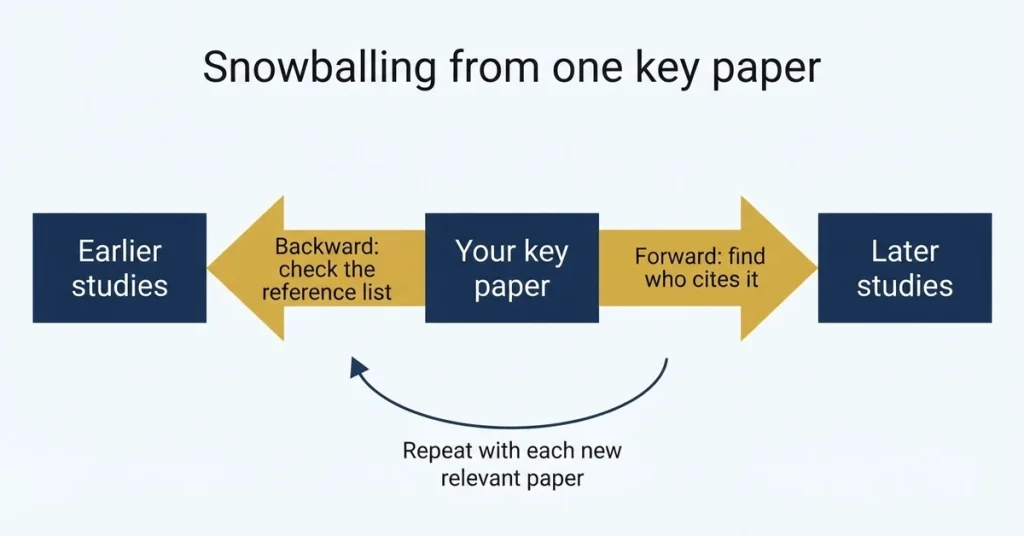
Snowballing, also called citation chaining or citation searching, finds new papers by following the citation trail of papers you already know are relevant. It can surface work that a keyword search misses because authors used different terminology, wrote in an adjacent discipline or used older terms. It runs in two directions.
Backward Snowballing: Check the Reference List
Read the bibliography of a relevant paper and pull out the studies worth chasing. No special tool is needed. It works best with well-cited reviews and highly relevant primary studies, because a narrow paper gives a thin set of leads. It also only moves back in time, so it cannot find anything published after your starting paper.
Forward Snowballing: Find Who Has Cited the Paper Since
Forward searching finds later papers that cite a known one, which catches recent developments, replications and critiques. Cambridge University library describes the routine: look up each included article by title in Web of Science, Scopus or both, then screen the citing articles against your criteria. Google Scholar also offers a way to view citing articles.
Counts differ between tools for the same paper, so relying on one will undercount. A very new paper may also look uncited simply because the databases have not indexed its citations yet. In that case, recheck after a few months or lean on backward searching.
Visual Tools: Connected Papers and Research Rabbit
Connected Papers draws a map from one starting paper. Its prior and derivative works are similarity-filtered subsets, not complete citation lists, so use it for quick orientation. Research Rabbit offers earlier-work and later-work modes that aim for a fuller trace from a paper or collection.
Record Snowballing Like Any Other Search
Log each snowballing round in the same way as your database searches. Cranfield University library advises checking every paper found this way against your inclusion and exclusion criteria, and reporting the number from each source separately, for example database searches, snowballing and ad hoc finds. If a round turns up new relevant papers, use those as fresh starting points and go round again.
Why Snowballing Cannot Replace a Database Search
Leeds University Library says citation searching should complement a robust search, not replace it, to limit publication bias. The 2024 TARCiS statement in the BMJ goes further for systematic reviews: stand-alone citation searching should not be used where the aim is complete recall. A single narrow starting set also biases what you can find, so run the database search first and snowball from what it returns.
When to Stop Searching: Saturation and Practical Limits
Snowballing has no natural endpoint, so the stopping rule is saturation. Keep chaining from newly added papers until a full round adds nothing new and relevant. Stop each branch when it stops yielding results, not after an arbitrary number of rounds.
Real projects also have limits. For a time-limited project, or a scoping review, capping the depth at one round can be defensible, provided you state the cap in your methods instead of presenting a time limit as saturation. Protect your calendar too: a dissertation timeline planner helps you give searching a fixed slot, so it does not swallow the weeks you need for writing.
Literature Search Mistakes and How to Fix Them
- Searching Google Scholar only. Add at least one subject database, and ask your subject librarian which one fits your module.
- Using one-word searches. Break the question into concepts and combine them with AND.
- Forgetting synonyms and UK or US spellings. Build the term list before you search, then add terms as you read.
- Truncating too early. Check what a truncated root returns before you keep it.
- Overusing NOT. Narrow with AND, dates or fields instead.
- Not keeping a log. Record each search as you run it, so you can repeat it.
- Cherry-picking. Confirmation bias is a recognised pitfall. Search several sources, ask for peer input and deliberately look for studies that disagree with you.
- Stopping after the first rewrite. Rushing a first draft can miss key terms and important studies, so iterate.
- Skipping expert help. Librarians are trained in database retrieval, and involving one has been linked with better search quality.
Can You Use ChatGPT or Other AI Tools to Search the Literature?
An AI tool is not a database, and it cannot replace a documented search. Where your university allows AI tools, one sensible use is brainstorming extra synonyms, which you then test in a real database. Never cite a paper you have not opened yourself, and confirm that every reference exists, because tools can produce convincing citations for studies that are not real.
Universities set their own rules on AI use and update them often. Position correct as of November 2026; check your university’s current academic integrity policy and ask your supervisor before using any tool in your search.
Literature Search Checklist Before You Start Writing
- My question is split into concepts, each with synonyms, spelling variants and abbreviations.
- I searched more than one database, and checked that my institution gives me access.
- Each search string uses brackets, OR inside concepts and AND between them.
- I checked my truncation and wildcards, and used NOT only where it is safe.
- The search retrieves the relevant papers I already knew about.
- My log records the database, platform, string, limits, date and result count for every search.
- I snowballed backward and forward, and logged the yield from each round.
- I can say why I stopped, and my supervisor agrees with the scope.
Quick Answers About Searching the Literature
How many databases should I search for a dissertation?
No fixed number applies. Because each database covers different journals, search more than one, and let your subject librarian and marking criteria guide how many.
Is Google Scholar enough for a literature review?
Rarely. It is a useful free supplement, but a general search engine is harder to repeat and report than a database. Use it alongside subject databases, not instead of them.
Do I have to explain my search in the dissertation?
It depends on your programme. A systematic review usually needs full reporting, and the PRISMA-S checklist has 16 items for describing searches. For a narrative review, many departments still expect a short account of databases, search terms, dates and selection criteria, often in the introduction to the review or the methodology chapter. Ask your supervisor, and keep your log either way.
Your Next Step
Write your research question at the top of a blank document today, split it into concepts and list five alternative terms for each. Then run your first bracketed string in one database and log the result. That single log entry turns searching from guesswork into a process you can improve.
Want a second pair of eyes on your search terms or review structure? Literature review support is available. Any model work is for reference and learning, and should be used in line with your institution’s policy.