
How to Code Interviews in NVivo: A Step-by-Step Guide for Dissertation Research

“I have 14 interview transcripts and my supervisor says to use NVivo, but I do not know where to start.” “Should I build my codes first, or let them develop as I read?” “How do I get from highlighted text to themes my marker will accept?” If you are asking these questions, the process to code interviews in NVivo is easier than it looks once you see the order of the steps.
Short answer: import each transcript, set up a case for every participant, create codes as you read or from a predefined list, select the passages that matter for your research question and code them, then group and refine those codes until you can build themes. NVivo stores, retrieves and compares your coding. It does not decide what your data mean, so the interpretation stays with you.
The steps below follow NVivo 15 on Windows and Mac. They cover the software side of interview analysis in detail and point to separate guidance for the method itself, such as reflexive thematic analysis step by step. Position correct as of November 2026: NVivo 15 is the current release line and still receives updates, but menu names and AI features change between releases, so check the NVivo help for your version.
What Does Coding Interview Transcripts in NVivo Involve?
Coding means attaching a short label to a part of your data that speaks to your research question. In NVivo, that label is a code, and every passage you attach to it is stored as a reference, so you can open the code later and read everything participants said about that idea in one place.
One terminology point saves confusion. Earlier versions of NVivo called codes nodes, and NVivo’s own help explains that the change to “code” was completed with the release that followed NVivo 12. If your university handout or older YouTube tutorial says “node”, it means the same thing as “code” in NVivo 15. You will also meet cases, which are the units you compare, usually your participants.
A code is not a theme. A code labels one idea in one passage. A theme is a pattern of meaning you build across many codes and participants. Keep that difference in mind, because it shapes every step that follows.
What to Sort Out Before You Open NVivo
Ethics and data protection. Interview transcripts often contain names, workplaces and places that can identify people. Replace identifying details with pseudonyms where your approved protocol allows, and store the project file only in the storage your university approves. If you are unsure what your approval covers, read the guide on ethics approval for your dissertation and ask your supervisor.
Software access. Many universities provide NVivo through their IT or library service. The University of Bristol, for example, lets its students and staff download NVivo through its SharePoint site, and its Doctoral College publishes short resources on coding interview and focus group data in NVivo. Check your own university’s page first, and do not assume a licence is free until you have confirmed it.
Your coding approach. Decide whether you will code inductively (codes come from the data), deductively (codes come from a framework you bring) or with a mix of both. The choice should follow your research question and methodology, not the software. If you are still choosing a method, the content analysis guide shows how a fixed codebook approach differs from reflexive coding.
Time. Coding is slower than most students expect, because you will read and recode more than once. Block out realistic weeks for it with the dissertation timeline planner before the deadline starts to squeeze you.
How to Prepare Interview Transcripts for NVivo
Clean preparation makes importing, case setup and autocoding far smoother. NVivo imports interview transcripts saved as Word documents or text files and treats them as document files you can code and edit. Before you import, work through this checklist:
- Keep one file per interview, and name each file with the participant’s pseudonym or ID. Matching names later lets NVivo link your participant details to the right case.
- Check the transcript against the recording. A transcript with misheard words will quietly distort your codes.
- Use the same speaker label every time, such as “Interviewer” and “P01”, and put it at the start of each speaker’s turn. This is what lets NVivo split a focus group transcript by speaker later.
- If every participant answered the same questions in the same order, format each question as a heading in Word. NVivo can then autocode answers by question.
- Remove or replace identifying details, and remove any password protection, because NVivo cannot import password-protected Word files.
- Avoid scanned PDFs of typed transcripts. A scanned page is only an image, so you cannot select or code the text.
If you recorded audio or video and want the transcript to play in time with the recording, NVivo can import a time-stamped transcript for a media file. Its help lists the accepted timestamp formats, so read that page before you format a long transcript. For the interviews themselves, the guide to designing and running semi-structured interviews covers recording and transcription choices.
How to Import Interview Transcripts into NVivo
Create a new project, save it straight away, then bring your transcripts in as files. In most versions this sits on the Import tab, though menu labels differ between Windows and Mac and between releases. Put the transcripts in a clearly named folder, such as “Interviews”, so that later queries can run on that folder alone. Back up the project file regularly in your approved storage, because a corrupted file in week ten is a painful discovery.
Open one transcript after importing. Check that paragraphs, speaker labels and headings arrived intact. Fixing a formatting problem on one file now is quicker than finding it across fourteen.
Set Up Cases and Attributes for Each Participant
Cases are NVivo’s units of analysis, and for interview research each participant is usually one case. A case can carry attributes, such as year of study or mode of attendance, which you can later use to compare groups. Set this up before you code heavily, because it is much easier than sorting material into cases afterwards.
There are two practical routes. If you hold participant details in a spreadsheet, you can import it as a classification sheet, and NVivo applies the attributes to cases whose names match the names in your sheet. If each transcript belongs to a single participant, you can code the entire file to that participant’s case. For focus groups, where several people speak in one file, NVivo can create a case for each speaker when your speaker labels are consistent. The guide on running a focus group for a dissertation explains how to plan that data in the first place.
How to Create Codes in NVivo for Interview Data
NVivo does not prescribe one way to build a code structure. You can create codes first and code to them, or create codes as you read and code at the same time. Which route suits you depends on your approach.
| Approach | How it works in NVivo | Suits |
|---|---|---|
| Inductive (open coding) | Select a passage, create a new code from it, and let the list grow as you read | Exploratory questions where you want participants’ own ideas to shape the framework |
| Deductive (predefined codes) | Create or import your codes first, then code each passage to the matching code | Studies built on an existing theory, framework or interview schedule |
| Hybrid | Start with a small set of predefined codes and add new ones as the data demand | Projects that test a framework but stay open to what it misses |
The Bristol Doctoral College material makes the same distinction and notes that researchers often combine the two, which is a sound option as long as you explain it in your methodology. If you work deductively, remember that NVivo can import a codebook saved in the standard .qdc exchange format, so a code structure built elsewhere can be reused.
How to Code Interview Transcripts in NVivo Step by Step
Work through your first transcript slowly. The pace picks up once your codes settle.
- Read the whole transcript first. Read it through, ideally while listening to the recording, and jot down early impressions in a memo. Coding line by line on first contact tends to produce labels that describe sentences rather than meaning.
- Select a meaningful passage. Open the transcript in the Detail View and highlight the words that carry one idea, usually a sentence or a short exchange.
- Code the passage. Drag the selection onto a code in the List View, or drop it in the empty space beneath the existing codes to start a new one and complete the New Code box. You can also right-click and choose the option to code the selection. NVivo also offers In Vivo coding, which names a code after the participant’s own words and suits early open coding.
- Describe every code. Open the code’s properties and write one or two sentences on what belongs in it and what does not. These descriptions become your codebook later.
- Allow overlap. A single passage can carry more than one idea, and NVivo lets you code it to several codes at once.
- Check your coding stripes. Coding stripes are coloured bars beside the text showing which codes cover each part of the transcript. Right-click a stripe to show all codes, only the most or least used codes, or coding density. Gaps may mean irrelevant material or something you missed, and a heavy cluster of stripes may mean your codes are not distinguishing between ideas.
- Review after the first few transcripts. Open each code and read all its references together. Merge duplicates, rename vague labels, and recode earlier passages if your understanding has shifted.
- Keep writing memos and annotations. A memo records your reasoning about a code or pattern, while an annotation is a short note attached to a passage. Memos can be coded and searched, but you cannot code an annotation. Dated notes on why you split or merged a code become your audit trail.
How Much Text Should You Select and Code?
Select enough for the passage to make sense when read alone, but not so much that it contains several unrelated ideas. A fragment such as “it was fine” means little without the sentence before it, while a whole page under one code makes retrieval useless. You also do not need to code every line. Code what bears on your research question, and accept that some material will stay uncoded.
Autocoding and the AI Assistant: What They Can and Cannot Do
NVivo’s autocode tool works from structure. On the Home tab, the Autocode wizard can create a code for each question when questions use heading styles, then code every participant’s answer to it. It can also code by speaker or paragraph. For structured interviews this gives you a quick map of who said what about each question, which is useful for organising material. It does not interpret anything, so treat it as a filing step before your own coding begins.
NVivo 15 also includes an AI Assistant that can summarise documents and suggest child codes, and later releases added AI-based sentiment autocoding. Lumivero states that data processed through the assistant is not used to train the underlying model, but that is a vendor statement, not your university’s approval. Before you switch it on, check three things:
- Whether your university’s academic integrity and AI policies allow it in assessed work.
- Whether your ethics approval and participant information sheet cover sending transcript text to an online service. The assistant needs an internet connection and acceptance of NVivo’s terms of use.
- How you will report it. If you use any suggestion, say exactly what it did and how you checked it against the data.
For reflexive qualitative work in particular, many supervisors expect you to do the interpretive coding yourself. Ask before you rely on any automated step.
Worked Example: From Interview Extract to Initial Code to Theme
The extracts below are invented for illustration and are not real participant data. Imagine a Master’s student interviewing UK university students about academic stress. The table shows how a statement becomes a code, a category and a candidate theme.
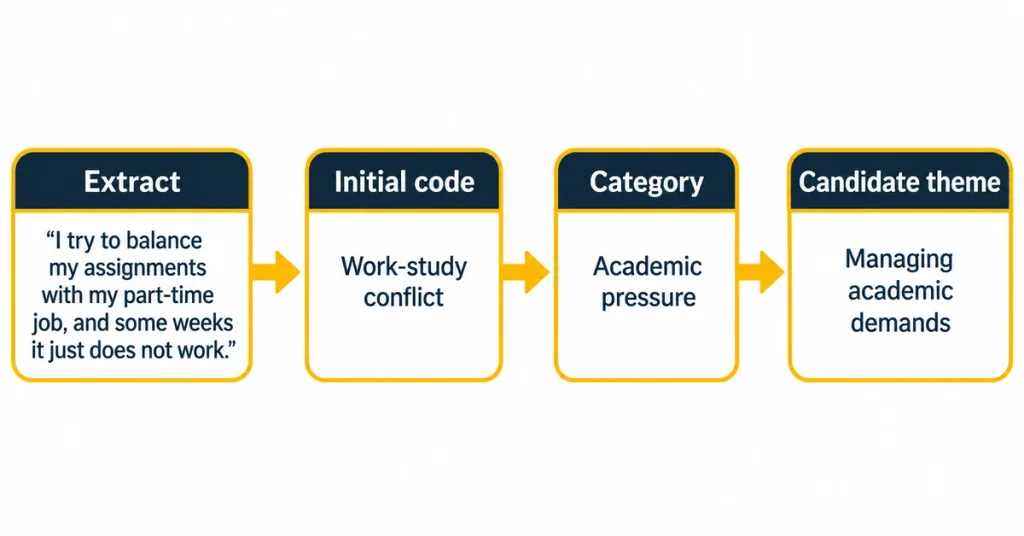
| Participant | Interview extract | Initial code | Category | Candidate theme (working title) |
|---|---|---|---|---|
| P02 | “I try to balance my assignments with my part-time job, and some weeks it just does not work.” | Work-study conflict | Academic pressure | Managing academic demands |
| P05 | “Most days I feel there is nobody I can talk to about it.” | Lack of support | Social isolation | Student support and belonging |
| P07 | “Planning my week on a Sunday night keeps me organised.” | Time management | Coping strategies | Managing academic demands |
| P09 | “My personal tutor walked me through the assignment brief, which helped a lot.” | Tutor guidance | Academic support | Student support and belonging |
Notice what happens across the rows. Codes stay close to the data, categories group similar codes, and the candidate theme says what the group of codes is about. Notice also that these working titles are still topic labels. A strong theme in the final write-up should state a pattern of meaning, for example “juggling competing demands without a safety net”, and that sharpening is your interpretation, not something NVivo produces. The guide to building themes from codes explains how to do that well.
How to Build an NVivo Codebook
A codebook lists your codes with their descriptions, so that you apply them consistently and can show your examiner how your framework developed. In NVivo, the descriptions you typed into each code’s properties feed the codebook, which is why filling them in as you go saves hours later. A practical layout looks like this:
| Code | Description | Include when | Exclude when |
|---|---|---|---|
| Work-study conflict | Participant describes paid work competing with study time | Work is named as reducing time, energy or attendance for study | Work is mentioned only as background, with no effect on study |
| Lack of support | Participant feels they have no one to turn to about academic difficulties | Absence of advice, contact or understanding is described | Participant describes support received, which belongs under another code |
To export it, go to the Share tab, open the Export menu and choose Export Codebook. NVivo’s help on exporting codes notes that you can save it in Word format, and earlier-version help also lists Excel and the .qdc exchange format. Check that every code has a description before you export. A Word or Excel codebook works well as a dissertation appendix, and the .qdc file lets you reload the same structure in another project.
How to Group Codes Into Themes and Subthemes in NVivo
Once your list of codes stops growing quickly, start organising it. NVivo lets you drag one code beneath another to create parent and child codes, and you can add folders to keep the list manageable. Parents are usually broader ideas and children are the specific codes beneath them. A sensible routine looks like this:
- Print or export your code list and read it as a whole, looking for codes that describe the same thing under different names.
- Merge true duplicates by dragging one code onto another, so that the references combine and nothing is deleted.
- Group related codes under a parent code that names what they share, not an alphabetical heading or an interview question.
- Open each parent code and read its references from every participant. Ask whether the extracts really tell one story or several.
- Split, rename or move codes where the references do not fit. Write a memo explaining each change.
- Draft each theme as a short statement, test it against the full dataset, and discard candidates with thin evidence.
Expect to loop back. Moving from codes to themes is interpretive, and a tidy folder tree does not prove you have a theme. Avoid locking your hierarchy too early, because grouping before you have read enough transcripts can force the data into categories you have not yet earned.
How to Compare Interview Participants in NVivo
Cases and attributes make cross-case comparison possible. A matrix coding query lays out a table with codes in one dimension and cases or attributes in the other, and each cell shows how many references intersect. Double-click a cell and NVivo shows the coded passages behind the number. Under the Explore menu you can run a matrix query that compares, for instance, what first-year and final-year participants said under each code. NVivo’s help on organising demographic data for interview participants walks through this setup.
Use these tables with care. Reference counts show how often something was coded, not how important it was to participants, and a small interview sample can make a count look more meaningful than it is. Treat the matrix as a way back to the evidence, then read the extracts before you make any claim.
NVivo also offers a coding comparison query that compares coding done by two people. That suits codebook and content analysis designs where agreement between coders is part of the method, but it does not fit every approach. Reflexive thematic analysis, for example, treats the researcher’s interpretation as the analytic tool, so a second coder and an agreement statistic can misrepresent the method. Read about checking reliability and validity to see which quality checks match your design.
How to Write Up Your NVivo Interview Analysis in a Dissertation
Your marker wants to see a clear route from raw data to claims. Saying “I used NVivo” is not enough, because NVivo is a tool and not an analytical method. In your methodology chapter, state these points:
- The analytical approach you followed, such as reflexive thematic analysis, and the reason it fits your research question.
- The NVivo version and what you used it for, such as storing transcripts, coding, and running matrix queries.
- Whether coding was inductive, deductive or hybrid, and how the codebook developed.
- How you protected participants, including pseudonyms and storage.
- Your reflexivity: how your background and assumptions may have shaped the coding.
- Any use of automated or AI-assisted features, described plainly.
Example wording to adapt: “Interview transcripts were pseudonymised and imported into NVivo 15. The first transcripts were coded inductively, and the resulting codes were described in a codebook that was revised as analysis developed. Codes were then grouped into candidate themes, which were reviewed against the full dataset in line with Braun and Clarke’s reflexive approach (Braun and Clarke, 2006). Analytic memos recorded each coding decision.” Adjust it to what you actually did, because your write-up must match your real process.
In the findings, present each theme with a short description, carefully chosen extracts labelled with a pseudonym or participant ID, and your interpretation of what the extracts show. An appendix with your codebook gives readers an audit trail. For the full chapter structure, see the guides on writing your methodology chapter and writing a dissertation results chapter. Your department may expect a separate findings chapter or a combined results and discussion, so check your handbook.
Common Mistakes When Coding Interviews in NVivo
- Treating NVivo as the method. The software organises your analysis. Your approach, such as thematic analysis, is what makes it an analysis.
- Using vague code names with no description. “Support” or “Barriers” will absorb anything loosely related. A short description makes coding repeatable.
- Coding everything. If most of every transcript is coded to something, retrieval stops narrowing your data.
- Reporting reference counts as findings. A code with many references is not automatically your most important theme.
- Skipping memos. Without them, you will struggle to explain your decisions at the viva or in your methodology.
- Sending identifiable transcripts to public AI tools. This can breach your ethics approval and your university’s data rules.
- Forgetting backups. NVivo prompts you to save, but copies in approved storage protect you if the project file fails.
Frequently Asked Questions About Coding Interviews in NVivo
Can NVivo code my interviews automatically?
Partly. Autocoding can organise transcripts by speaker, heading style or paragraph, and newer AI features can suggest codes or detect sentiment. None of that replaces reading the data and deciding what it means, so use automated steps as a starting point and check them against your transcripts.
What is the difference between codes and nodes in NVivo?
Nothing, apart from the date of the version. Older releases used “node”, and current ones use “code”. Cases, which represent participants or other units you compare, are a separate item.
How many codes should I create?
There is no correct number. It depends on your dataset, research question and approach, and your list will usually grow, then shrink as you merge and group. Judge your list by whether each code is clearly defined and useful, and ask your supervisor what they expect.
Can I do thematic analysis in NVivo?
Yes. NVivo supports the coding, retrieval and grouping that thematic analysis needs, but the analysis itself comes from your reading and interpretation. Name your approach in your methodology and follow its phases.
Do I need NVivo for a dissertation?
No. Manual or spreadsheet coding is acceptable for a small dataset if you can trace every code back to its extract. NVivo becomes more helpful as the dataset grows and you want to retrieve, compare and document your coding. Check what your department expects.
Can I code focus group transcripts the same way?
Yes, with one extra step. Use consistent speaker labels so that NVivo can create a case for each speaker, and remember that group interaction is part of your data, not only individual statements.
How do I report NVivo coding in my methodology chapter?
Name your analytical approach, the NVivo version, how you built and revised your codes, how you protected participants, and any automated features you used. Put your codebook in an appendix as evidence.
Getting Help With Your Coding Framework
Your supervisor should be your first contact for decisions about method and coding. If you want extra support shaping your analytical approach, dissertation methodology help can talk through your options. Once your themes are developed, support with your findings chapter can help you present them clearly. Use any support according to your university’s academic integrity policy.